woensdag 9 december 2009

Nvidia tablet


Nvidia’s tablet…
posted by studangerous on Wednesday, November 11, 2009 at 2:54 am. Originally submitted by Akiyama Mio


Nvidia’s CEO showed off their prototype tablet at a press conference recently and then proceeded to talk up his love for all things Apple. That’s a very nice beveled edge and recessed home button…
Update: it’s an ODM Tegra prototype tablet

iClassic Released on Cydia Store


iClassic Released on Cydia Store
posted by spoonforknife on Tuesday, December 8, 2009 at 4:17 pm. Originally submitted by Cstsxyfry212


iClassic, the long-awaited and oft-delayed emulation of the clickwheel experience of iPods of yore, has finally hit the Cydia Store. iClassic is available for a mere $1.99 and was created by iPod touch Fans’ members Cstsxyfry212 and Peleaz-1. You can check out a review by the Member Reviewer team here.

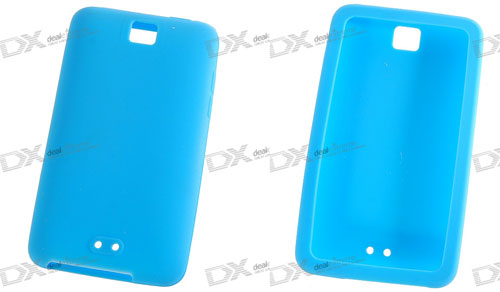
ipod touch 4g case camera hole


TechCrunch now claims that they too have heard evidence that the next generation iPod Touch will have a built in video camera.
One of our sources in Asia say that Apple has placed an order for a massive number of camera modules of the type that they include in the iPhone. These are inexpensive cameras, in the $10 range. And the size of the order, our source says, means they can only be used for one thing - the iPods.

The rumor that the iPod Touch would get a camera first appeared in May from HardMac. The rumor, however, now makes more sense since the introduction of the iPhone 3GS which features video as a major new feature. When Apple does update the new iPod Touch, it seems likely that they will also upgrade the device to the more powerful processor and graphics chips that were introduced in the iPhone 3GS.

Meanwhile, TheAppleLounge points to another 3rd generation iPod Touch case design at DealExtreme which again shows off a centrally mounted camera hole:

Macintosh/iPhone software update roundup - December 8, 2009

Macintosh
SpectorSoft Corporation launches eBlaster mac 2010, the latest update to its best-selling remote monitoring software for the Mac platform. With this major upgrade, SpectorSoft expands the capability of parents or business owners to monitor their children or employees from a remote location. This new Version adds tools to record Web Mail such as Google Gmail, Yahoo Mail and others, plus new Web Site and Chat Blocking and Advanced Keyword Alerts to warn of potential danger.
Vinotekasoft has announced Vinoteka 1.5.3, an update to their ultimate wine cellar management solution for Mac OS X. In a unique and gorgeous interface showing bottles, cellars and tasting notes, Vinoteka brings the best wine cellar management experience to Mac users. Customizable and user-friendly, straight-to-the point and nevertheless very professional, Vinoteka is the ultimate companion every wine lover needs. Version 1.5.3. sports many new feature improvements and a recommended update.
Burn37.com Inc. has announced GuestReel for Mac OS X. GuestReel allows you to easily setup a video guestbook at your wedding or other special event without the need for a lot of time, experience, or money. GuestReel transforms your guestbook into an interactive experience for everyone. GuestReel clips can be uploaded to the web, burned onto DVD, embedded into wedding day footage, and enjoyed repeatedly.
Yazsoft has announced Playback 1.2.1, an important update to their new zero configuration media server for Mac OS X. With a focus on ease-of-use, Playback allows anyone to share their media with any Playstation 3, Xbox 360, or other supported UPnP compatible device. Playback can also share media stored in folders or even make entire disks available to a Playstation 3 or Xbox 360. By default, Playback will share almost any content on the users system.
Macvide has announced iPod Converter 3.2, an update to their video to iPhone/iPod mp4 conversion utility for Mac OS X. iPod Converter allows conversion of video files to mp4 iPod video. MacVide iPod Converter provides powerful functions to set different settings for your video files. iPod Converter offers an easy-to-use interface that guides the user through the conversion process. Version 3.2 features improved the video engine, 3x processing speed, Snow Leopard support and more.
Ironic Software has announced Yep 2.0, an update to their popular document management software for Mac OS X. Yep is aimed at helping indivduals and small companies track and organize their documents. It automatically tracks the most common types of documents, and documents of any kind can be managed as well. Yep also has an auto filing feature that can help even the hopelessly disorganized types. Yep 2.0 also features a true document scanner.
danholt4mac has released Calories 2, a major upgrade of the beloved tracking daily nutrition software for Mac OS X. Calories 2 has been completely revised and reengineered introducing a bunch of new features. Calories 2 now offers weight tracking with automatic BMI-calculation and calendar. Thanks to the new weight-panel you can now collect weight data and even more data from body analysis scales. Calories 2 can access and fetch data from the brand-new Withings WiFi body scale.
be.ez, designer of fashionable accessories for the mobile lifestyle, has announced the latest addition to its line of laptop carrying cases for the popular 13” MacBook (Pro). The new LA garde robe bag is the perfect companion to be.ez’s top-selling LA robe sleeve for Apple laptops. The LA garde robe can be bought individually for $34.95 from December 10th or with a LA robe sleeve to complete the set for $49.95 from Feb 2010.
iPhone/iPod
148Apps announced the call for entries for the second annual Best App Ever Awards, which recognize practical, creative, technical, and whimsical achievements in iPhone applications and games. Submissions are now being accepted in 56 categories. Created with the goal of building public awareness of the very best apps available, not just the best-selling apps, the Best App Ever Awards has a broad set of award categories covering both apps and games. The categories focus on the quality of the app design, the overall usefulness, and the fun factor.
Lucky Me Lite is a series of 14 mini games which helps test your luck. At the end of the 14 games, you get your luck score with a fortune quote which describes how good or bad your luck is heading to. Lucky Me Plus is now a loaded iPhone/iPod touch game with 14 back to back games, and lot of customizing features. It comes with a customized play list and a quick luck option, and allows users to ‘tweet’ their scores apart from a few more exhilarating features.
99Games has announced the release of its brand new game, Pocket Clinic. The game challenges the players to don the coat of a doctor and separate the infected and good cells in a tissue into two different zones. Pocket Clinic offers 20 levels of addictive game play and 2 distinct game modes: Timed and Challenge. The game supports accelerometer as well as multi-touch mode, and the players can post their high scores on Facebook or Twitter.
Appnoose, Ltd., who recently released Gorilla Monkey Crunch for the iPhone and iPod Touch, have launched a competition to win an iPod Touch by being the first player to register a score of 10,000 using the installed OpenFeint global leaderboard. Contestants need to have Gorilla Monkey Crunch, a free OpenFeint account and contact Appnoose via Twitter after they have achieved 10,000 or more points.
ShadesCases Inc. has released all new Shades for the new iPod nano5G with Camera. The cases cover the entire iPod nano including the screen & click-wheel, but leave an opening for the video camera. Shades for nano 5G come in 10 colors that compliment the nano’s vibrant colors or choose Clearly Original to keep the cool sleek look of the iPod itself.
Connect2Media have come up with another App Store gem in Arachnadoodle [iTunes App Store link], available now on the Apple App Store. On sale at the special promotional price of $0.99/£0.59/0.79€, the game has already drawn comparisons to Peggle. In the game you control of Boris the spider. Using your finger to aim and determine strength, you fire the lovable arachnid around various rooms of the house in order to link pins and create webs. Once all the pins are connected your iPhone belts out Wagner’s “The Ride of the Valkyries” and a sweeping swarm of flies sweeps across the screen. How many flies become ensnared in your wicked web depends on how complex it is.
Low Grav Racer 2 [Tunes App Store link], the instantly playable arcade racer, is back and this time it’s bigger, better and faster. In Low Grav Racer 2 you race across 18 planet and space system based tracks from the Dante Nebula to the Arkonian Rift. Low Grav Racer 2 combines intense high speed racing and shoot-em-up action to create a unique handheld experience, only on the iPhone and iPod Touch.
TuneWear announced today that it is now shipping the new slim case series PRIE Ambassador SMART for iPhone 3GS/3G. The Ambassador SMART cases are made from high quality leather and are available in Black with Red stitch, Black with White stitch and White with Pink stitch.
ADS Software Group Inc. has introduced Classical Music 1.0, their new classical music compilation and quiz for iPhone and iPod touch. Developed specifically to leverage the iPhone’s unique capabilities, Classical Music is an educational database of 50 music compositions of the most famous composers of all time. Music aficionados can listen to a short passage of every composition, view a short biography of each artist, and purchase the full version of the composition from iTunes.
Daze End Software has announced the release of Listmaker 1.2, a new version of their list manager for the iPhone and iPod touch. Listmaker is a simple tool for storing and organizing user-created lists. Major features include support for nested sublists and web synchronization. This new version adds often requested features such as searching, and the ability to create lists from the contents of the iPhone’s clipboard.
Oneapp has introduced The Laughman 1.0 for iPhone and iPod touch. The Laughman now allows you to bring contagious laughter wherever you go. The Laughman features the world famous laughs of Doug Collins, a bus driver from Tennessee said to have the most contagious laugh in the world. Collins, who was tested by MTV and even examined by Neuroscientists, can often cause rooms of people to burst into laughter simply by laughing.
Niles Technology Group has announced their Achievers Writing Center apps for iPhone and iPod touch. Achievers Writing Center apps are revolutionizing how high school and college students write essays and papers. The apps make it easier to be more successful at writing, and they also significantly reduce the time and money required to produce excellent work. For a fixed, affordable price, each app comes with professional writing center services and more.
Toughturtle LLC has released StockWatch Lite 1.0, a free version of their popular investment-tracking iPhone and iPod Touch App StockWatch. StockWatch Lite is a great entry point into tracking your personal investments and getting a glimpse of the power and features of the full version of StockWatch. StockWatch Lite is the perfect App for all investors to keep an eye on their favorite stocks, track their portfolios and holdings, and much more.
Geospace and developer RogueSheep announced today that the Word Spin Lite [iTunes App Store link] game for iPhone and iPod touch is now available for free from the App Store. The Word Spin App combines the elements of popular word games, crossword puzzles and word searches into a portable game for iPhone and iPod touch. The app is a great way to sharpen language skills by identifying words and anagrams from two to eight letters in length.
Carnation Software has released Say it & Mail it Lite 1.0 for iPhone and iPod Touch, and it is free. Say it & Mail it Lite is a quick, easy way to email a voice memo from your iPhone or iPod Touch to yourself or to others. No typing required—a fast and easy way to send a detailed email without using the keyboard. Email address and subject line are autofilled. Emailed voice memos are compatible with Mac, PC and any other computer.
PhatWare Corporation has announced PhatNotes for iPhone 1.0 and PhatNotes Desktop 5.5, their award-winning professional strength notes organizer for iPhone and iPod Touch devices. PhatNotes delivers the most advanced and simple-to-use notes synchronization. It offers both handwriting recognition input and keyboard entry as well as advanced note editing features such as shorthand, customizable auto-corrector and user dictionary, and spell checker.
JustPurePics has released Sexy AppBox 1.6 for iPhone and iPod Touch. Sensual lingerie, sexy glamour, beauty unleashed, and seven more applications are now united under one cover. Sexy AppBox features 50 most seductive shots from each of these collections. Now users get ten times more photos of gorgeous females at the price of just one application. Each shot was made by well-known professionals in the area of female beauty and photography.
Scosche Industries, a leader of iPod, iPhone and mobile electronics aftermarket accessories, announces the launch of the free Scosche Application for iPhone. The free Scosche App is the first application that allows users to instantly find aftermarket accessories specifically designed for their vehicle. The simple-to-use application also includes all of Scosche’s iPod and iPhone accessories. With the Scosche application, users can easily find accessories, email results to friends, easily purchase an accessory directly from the app, and simply locate dealers in the area all from their iPhone or iPod touch.
Now you can get a graph of your night’s sleep with your morning coffee. The new version of the Sleep Cycle alarm clock for the iPhone will not only wake you up at the perfect moment, it will also show you a graph of your night’s sleep. The Sleep Cycle alarm clock is the best-selling iPhone application that analyzes your sleep patterns and wakes you in the lightest sleep phase—a natural way to wake up where you feel rested and relaxed. With the recent upgrade to version 2.0, we have included the feature that has been requested most by our users—the ability to see a graph each morning of how you’ve slept.
FutureTap has announced Where To? 2.5, the popular points of interest finder for iPhone and the several times awarded NAVIGON MobileNavigator work together seamlessly. The MobileNavigator is able to be started via the AppInteract-Interface directly out of the Where To? application and users will be guided to searched points of interest. Location Based Services and real Turn-by-Turn navigation never have been so close before.
288 Vroom LLC has introduced 301+ Short Stories Lite, the free version of their top-selling eBook reader for iPhone and iPod touch. Developed for iPhone and iTouch devices, 301+ Short Stories Lite is quick, easy, and entertaining reading for on-the-go or anytime. The app features continuous and page by page scrolling modes, automatically bookmarks each story as needed, and more. Sit back and unwind to a taste of over 300 of some of the greatest short stories of all time.
Heavenspot, an independent digital creative agency, and its sister company AppWagon, are collaborating with Grammy award-winning artist and philanthropist, Ziggy Marley to create the musician’s first iPhone application Ziggy Marley’s Music Mixer. Available today, the application features five brand new socially-conscious tracks created exclusively for the iPhone and iPod Touch.
Online brokerage site ZipRealty.com has announced the launch of its free real estate app for the iPhone and iTouch, making it easier than ever for people to find their dream home. The app searches Multiple Listing Service “for sale” homes in over 4,800 cities, offers price estimates from other online sites, and showcases homes that recently sold in the user’s desired neighborhood. Also, thanks to location-based GPS technology, buyers can now search homes for sale within the neighborhood of where they’re standing at that moment.
Subscribe to keep up with the latest Apple news and rumors

dinsdag 8 december 2009

Apple Tablet delayed until late 2010?


The rumors just keep rolling in on Apple’s now legendary tablet. Sadly, they don’t always get better. The latest rumor from DigiTimes claims we’ll have to wait even longer to get our hands on that Apple Tablet we all want so badly. But don’t get too sad, the extended wait is said to bring some benefits, like a lower price and an OLED option.

The rumor states that Apple decided to postpone the launch of the tablet to allow time to have a second tablet model with a 9.7 inch OLED screen. This would be in addition to a 10.6 inch TFT LCD model. OLED would obviously cost more, but the delay may have an added benefit of lowering the price of said panel.

They go on to state that displays normally account for about 30% of the total cost of a device such as this, and with current 9.7 inch OLED panels going for around $500 that sets the total manufacturing price at $1500-$1700 and a retail price up to $2000.

What!? It was just a few months ago that this rumored Apple Tablet was going to hit the sweet spot between netbooks and laptops in terms of price. I know it’s not in Apple’s moral fiber to produce a machine with less than stellar parts, but come on! Two grand is simply too much for such a device. Of course, the rumor also states that the 10.6 inch LCD model should be a bit less than a grand. That’s a bit more manageable, but I’m not sure I’m convinced overall.

Wouldn’t it be easier and more appealing to consumers to have an LED LCD model, for say, $1000? I wouldn’t be happy paying this much for—based on all of the available rumors—what appears to be an overgrown iPod touch. But I think I would likely talk myself into the purchase anyway. Now, about this two grand option; not a chance. OLED may be amazing, but I’d have to see a much more significant price drop to justify an upgrade like that for a device like this. And honestly, it would likely happen in a year or so, which is also about the time I’d expect Apple to release a refreshed version anyway.

As much as I don’t want to wait any longer for Apple’s long rumored tablet, I’m convinced enough by this article to accept its timeline. I don’t find it hard to believe Apple would wait even longer to release a device—even with this much hype—until it’s exactly the way they want it. I just wish they’d get there quicker.

Via Gizmodo

iPod touch with camera coming this spring?


I, like many others, was pretty bummed when the rumors about the flaw in the upcoming iPod touch camera prevented it from being produced this year. But time has passed, and apparently Apple is pretty close to fixing those issues. They may be ready to launch the iPod touch with camera in the spring. It’s still unknown whether this upgrade would include a 2 megapixel camera like the iPod nano or will have a nicer iPhone 3GS like camera.


It’s almost comical if you’ve seen one of these iPod touch cases that has “convenient access for camera” in the stores. I saw this one about two weeks ago and had a good chuckle. I think it’s pretty obvious that Apple will be releasing an upgraded iPod touch with a camera on it, it’s really just a matter of time.

Via iPodNN

Dropbox: Free Online Storage


With storage solutions dropping in price year-over-year, companies are building their solution on the back this change. Dropbox is such a company, offering a fast and secure online storage solution, with a starting package that’s absolutely free. Yes, you read that right, free.

With the going rate for a 2GB thumb drive floating anywhere between $5-10, having access to 2GB of online storage an no cost starts to sound appealing. The free Dropbox account comes with 2GB of space that you can use for as long as you like. If you need more than 2GB of space, they offer ‘Pro’ plans for up to 100GB. This is by no means a review, rather an overview of the solution.

Online Backup

Each time you drag a file in to your Dropbox folder it automatically sync back up to their secure servers. This negates the need to carry around a USB thumb drive, as you can securely gain access to your files from any computer with an internet connection.

*

File Sync

If you’re looking to sync files across multiple computers, you’re in luck. The Dropbox software is currently compatible with all three major operating systems, including iPhone OS. If you’re dropbox account is authorized on more than one computer, any files that you sync using one device will automatically be accessible from all the other devices. This makes keeping your content in sync, in the home and office, a breeze.

File Sharing

Most email clients throw a strop when you try to attached and send files that are larger than 10MB. With Dropbox, you can upload your files and share them with anyone, without the hassle of moving around large files. Simply upload you file and enable sharing. You can even specify particular recipients and password protect the shared file. Not bad for something that’s free.

History

Every time you save a file in Dropbox, Dropbox syncs it to their secure servers. They keep a history of every change made so that you can undo any mistakes and even undelete files. By default, they keep the last 30 days of undo history for all your files. So, it’s essentially an online version of a mini Time Machine.


I’ve been using Dropbox for a while now, for those little things and as a double backup for several critical files. You can never be too sure when your external hard drive might fail!

Will Motorola Get its Mojo Back with Droid?


Motorola is the company that literally pioneered mobile communications. Once an industry giant, the handset maker has since fallen on hard times and many (including yours truly) have questioned whether Moto can get its mojo back. They haven’t had a successful new product since the iconic Razor, which launched them on a meteoric rise to success earlier in the decade - in a time when common feature phones (or dumb phones as I like to think of them) ruled the marked. But feature phones gave way to the rise of smartphones, and the big M has been in a free fall ever since.

How this happened is no mystery. Motorola is one of those companies that never seemed to grasp the importance and interplay between software and hardware. Their philosophy, like so many others at the time, was that if you made a sleek shiny phone, consumers would buy it no matter how what software it ran on, or how bad. To that end Motorola phones looked cool, but the software that powered them was anything but. In fact, Motorola’s proprietary mobile platform represented the absolute worst user experience in the industry. Nokia’s Symbian operating system looks like OSX to Motorola’s un-namable and utterly forgettable OS.

As a market slowly built up around smartphones, Motorola continued to limp along with its outdated design philosophy (hardware first, software second - a mere afterthought) and the hemorrhaging began. Moto’s market share began to plummet, and by the time they jumped on board the smartphone bandwagon it was too late. Previously unheard of Taiwanese handset makers like HTC suddenly became rising stars and household names. And once Apple entered the market, Moto was doomed. While the fat lady may not have sung just yet, she can be heard clearing her throat in the next room.

The last hope for Motorola may be in the form of the Droid phone, set to debut on Verizon’s network. It’s an ambitious device that puts them back in the game with a credible product. But in the end it will take a highly successful and ubiquitous mainstream device to put them on path to success. In short, they need another Razor. And Droid isn’t it. For starters, it is high end device - very good high end Android device, but top tier non-the-less. They company should be aiming down market with an affordable product that everyone covets and can afford - something that runs on Android. Motorola should design an a simple iconic device, perhaps in the form factor of a Blackberry, that has mass appear, and can be had for free (with contract) or under $50. Do this and the chance is high that Motorola will set the market on fire and regain its mojo. As it stands now I see Droid as an ambitious yet futile effort to make inroads in a market they’ve already lost. Will Motorola succeed - what do you think?


As Apple continues to push out updates that add demanded features, users are finding fewer reasons to jailbreak their iPhones. Still, there are some truly powerful modifications that resolve a majority of your iPhone gripes. We’ll take you through five of the most useful jailbreak applications that might finally pull you into the jailbreak community.


#5 PdaNet


As it stands, those of us in the U.S. are without a tethering option. PdaNet provides an easy way to connect your computer to your iPhone’s data service. Although it’s against the ToS of AT&T (they obviously want you to pay for it), there’s extremely low probability they’ll ever find out (we won’t tell if you won’t). Until a tethering plan is announced from AT&T, jailbreaking is pretty much your only option.


#4 3G Unrestrictor

There are numerous apps that are only usable over a WiFi connection like Skype and SlingPlayer. 3G Unrestrictor tricks your iPhone into thinking it’s on a WiFi signal, so every app that has been disabled over 3G works as it would on WiFi. That means no more grainy YouTube videos and no more restrictions on the size of the apps you download over the data network. For heavy SlingPlayer users, 3G Unrestrictor will make you one very happy camper.

#3 SBSettings

SpringBoard Settings allows you to swipe across the status bar to drop down various settings and options. This can be triggered in nearly every application that displays the status bar. Think of it like a dock for the most popular iPhone settings. You can customize which options you want displayed, and just tap to toggle that setting. Within this menu, there’s also a secondary dock where you can hold far more apps than the traditional four. One of the best features here, is the ability to kill running apps that may be eating your battery.

#2 Backgrounder

Unfortunately, there are only a handful of Apple’s applications that can run in the background. Thankfully, Backgrounder has created a solution that allows any app to run even after it’s been closed. By holding down the home button for about one second, a notification appears to let you know the app will continue running after you let go. Don’t worry, though, voice control is activated after almost 3 seconds so you won’t accidentally trigger it. Disabling a background application is done the same way.


#1 BiteSMS

Quite possibly the most useful jailbreak app available, BiteSMS is about to blow your mind. Until now, every SMS you’ve sent required you to open the messages app to send. No longer. With BiteSMS, you press the volume rocker and tap the ringer icon that appears. This opens up an SMS quick reply window that finds your contact as you type their name, and allows you to send an SMS from any app without closing it. Incoming texts show the standard message and below it you’ll find the standard reply box. Words cannot express the glory of this application and it’s a path you’d expect Apple to have created.


What are your favorite Jailbreak applications? Haven’t Jailbroken? Why not? Sound off in comments!

TwitterPeek Fails to Gain Followers

Every once in a while a product comes along that, from all appearances, seems altogether poorly conceived and ill-designed, but later proves to be otherwise in my tests - leaving me pleasantly surprised. Unfortunately the TwitterPeek does not fall into this camp. Sometimes you really can judge a book by its cover, and this one is badly torn and missing a few chapters. At first blush the Twitter Peek looks like a badly designed and functionally decrepit device - which is exactly what is. I’ve been using this product for the past two weeks and have to say it without doubt one of the most abysmal new products I have used in a long time. And that is a heavy indictment. Here’s why.

A Flightless Bird

First, let me lead into this review stating that while I find single-purpose devices to be more or less irrelevant in an age of multi-tasking smartphones and gadgets that perform just about any given task, I am not entirely apposed to the idea a product that does just one thing really well. But therein lies the catch - it must serve the role for which it was designed incredibly well, and with great ease and innovation. In the TwitterPeek’s case, it delivers on it’s Raison d’être in the worst possible ways.

Let’s start with the device itself. From a design standpoint it’s something of an ugly duckling; awkward to hold and operate. Borrowing a few queues from the ever popular Blackberry, utilizing a traditional fixed QWERTY keyboard in a familiar form factor. But the design is more reminiscent of a Pop Tart than a Blackberry Curve, and it’s all-the-more inconvenient to use. The keys are too small, making typing a challenge - unless you enjoy depressing keys using the corners of your thumbnails. A jog dial provides the basic means of navigating your way through the built-in software - only problem is, being right-handed, I tend to hold the device in my LEFT hand and operate its features using my right. Yet the jog dial is thoughtlessly located on the right side, forcing me to hold the device in the wrong hand. Frustrating.

Fail Whale

I can overlook the hardware complaints, being a matter of personal taste, but the steak driven into the heart of this product is its software. The interface is based on Peek Inc’s previous product, born in the form an e-mail device. TwitterPeek shares the same software, right down to it’s insane UI. When one thinks of a Twitter client, your mind conjures images of rich desktop client apps like Tweetie or Twitterific for Mac, Tweetdeck perhaps. All of which display tweets in a graphically sleek UI with large avatars and chat bubbles representing users and messages they tweet. Nope, not here. Instead TwitterPeek displays lists of recent tweets as just that - a list. In fact it doesn’t even display the message body of individual tweets, forcing you to open them in order to read their contents. In exactly the same manner you interact with e-mail on a mobile device. And that’s no accident, as this device is based straight off of its e-mail-centric cousin.

This UI isn’t simply lacking polish, it’s functionally retarded - making even the simple act of viewing tweets (the device’s sole intended purpose) all but impossible. Looking at the screen it’s excruciatingly difficult even to distinguish your OWN tweets from the people you follow, which are lost among a list of obscure truncated usernames.

It gets worse. An annoying bird-like chirp notifies you of the arrival of new tweets. You open a tweet by way of the jog dial, scrolling up/down to your tweet of choice among in the list, and depressing the dial - which then toggles a popup menu. Click “View tweet” to select and open your tweet. Sound like a lot of unnecessary work to perform a simple task? You’re paying attention, because that’s exactly what it is. It goes on.

Missing Bits

One of the most common uses for Twitter is sharing links to cool or otherwise interesting stories with your followers. Being such a vital function, you wouldn’t think to even ask if this product supports HTML or offers a built-in web browser. But the answer to both is NO. Instead of displaying web pages, clicking a link presents you instead with a hideous screen of cryptic text - as TwitterPeek runs HTML through a paper shredder and spits out raw text. Who needs the mobile internet anyway, right?

And if these encumbrances weren’t reason enough to bail, there is the basic operation of the device, which performs incredibly sluggish. As in molasses poured through a sieve. Just scrolling through your list of tweets is mind-numbingly slow in responsiveness. Your scrolls register moments after movement of the jog dial. Yes, it’s THAT bad.

I could go on and on (more so than I have) regarding this product’s lengthy shortcomings, but my above description pretty much sums up this device in one swipe. It’s a dud.

TwitterPeek is available for the low price of $99, which buys you just 6 months of service (this is a cellular device after all). A lifetime contract, which I predict to be short (spanning life of the company, not yours), is available for $199.

I can’t say whom the target market for this product is, save for teenagers perhaps. But with teens already carrying mobile phones capable of browsing the web, e-mail, instant message, SMS, etc., it’s hard to see where this fits into their pockets. And I can’t envision any teen placing this device on their Christmas lists this year. Nor would I recommend it.

The best browsers out there

At one point in time, back when it was really a nonissue, we were without a choice of internet browsers. In fact, as the very first graphical web browser, Netscape consumed 90% of all web use. Soon after, Microsoft began bundling Internet Explorer with Windows resulting in a massive market share shift in the coming years. Since then, we’ve seen the introduction of several key competitors that force innovation within the market.

Internet Explorer

On it’s eighth release, a majority of all web browsing is done through Internet Explorer. Actually, 61% of U.S. web browsing is done through some version of Internet Explorer. Worldwide, Internet Explorer accounts for a slightly higher 62% of the browsing market. Bundling Internet Explorer with the most popular operating system in the world allowed Microsoft to attain an impressive 95% market share back in 2002.

Firefox

Eventually Netscape became part of the Mozilla, in an attempt to push web browsers into an open source model. The first version of Firefox was released in 2004 and, two and a half versions later, has since attained almost 30% of the U.S and worldwide browsing market. Earlier this year, Firefox reached 1 billion downloads. For not being preinstalled on operating systems, Firefox has come a long way.

Safari

A beta version of Apple’s Safari web browser was released in early 2003 and became the default browser with the release of OS X Panther. Now on its fourth version, Safari was the first browser to pass the Acid3 test that rates how a well a browser follows web standards. Within the last year, Safari has managed to capture 6.5% of the U.S. market share and only 3% worldwide. Safari has since been ported to the iPhone and iPod Touch, capturing 22% of the worldwide browsing market.

Chrome

One year ago in September, Google released Chrome. Based off the same WebKit browser as Safari, Chrome has since been publicly released only on windows with an OS X beta version due this month. Despite being in its infancy, Chrome has already captured almost 3% of worldwide browsing. With the release of the Chrome OS sometime next year, expect these numbers to continue climbing.

Opera

Released back in 1996, Opera was developed strictly for the Windows platform. Opera actually required you to pay for the browser, something completely unheard of in today’s world. Opera accounts for 2.7% worldwide market share and a measly .55% in the United States. Opera eventually ported an optimized version for mobile devices that has seen a much higher adoption rate, claiming 25% of the worldwide (3% U.S.) mobile browsing market share.

Although the numbers for each browser don’t appear all that promising, each has helped push web development into what we see today. Expect to see these five browsers around for quite some time. What is your browser of choice? What makes it so? Let us know in the comments.

[Statistics via StatCounter]

Dev-Team Finally Releases PwnageTool 3.1.4!

Lagging behind GeoHot, as usual, the Dev-Team has finally released PwnageTool 3.1.4 which can now jailbreak iPhone OS 3.1.2.
SUMMARY:
The iPhone 3GS is now supported out of the box in PwnageTool 3.1.4 (or if you have upgraded to 3.1.x in iTunes)
The iPod 2G is still supported in PwnageTool 3.1.4 but you must already be jailbroken (we’ll update this if there’s a big demand from non-jailbroken ipt2G owners)
The iPod touch 3G is NOT supported
Also make sure you are getting your ECID hashes from the new firmware just in case the security holes are patched in the future. The Dev-Team also states that if you update through iTunes to firmware 3.1.2 you will lose your unlock and they have no ETA as to when a fix will be available. It is strongly recommended that if you are planning on upgrading you use the PwnageTool or risk losing your unauthorized carrier. Also if you upgrade past 3.9, and you are currently using internet tethering by an unauthorized carrier, you will lose that ability until a new hack is produced.
The Dev-Team also made a comment to those who already used blackra1n, “For the early adopters who ran blackra1n and are having problems with mobilesubstrate, winterboard, diskaid, or ifunbox, you can install a custom .ipsw from PwnageTool to fix these issues. That’s because all jailbroken devices accept a custom .ipsw created by PwnageTool. (However, if you ran blackra1n on a 3G or 3GS that means you updated to stock 3.1.x, and the carrier unlock is now out of reach. We’ll continue to work on a carrier unlock for the latest basebands, but the timeframe for such an unlock is unknowable.)“

Verizon Tries to Take Another Stab at the iPhone.

Verizon announced that it was going to have a new ad campaign targeting the iPhone and its customers in the near future. Well as of today the prelimanary steps of the ad have made its rounds.
The new ad has been put up as more of a website for people to register on, than an actual “advertisement” per say. The website states:
iDon’t have a real keyboard
iDon’t run simultaneous apps
iDon’t take night shots
iDon’t allow open development
iDon’t customize
iDon’t run widgets
iDon’t have interchangeable batteries
Everything iDon’t
Droid Does…
At the bottom of the website you have the ability to register your email to be notified when “compromise has been deactivated”. There also appears to be a countdown timer that has the same timeout as the day the Motorola Sholes are released.

Ikee, The First Worm Targeting Jailbroken iPhones, Has Been Reported!


There has been a new worm that is targeting specifically jailbroken iPhones reported in Australia today. The worm is named after its creator Ikee.
The Ikee worm doesn’t seem to do anything harmful to the iPhone other than changing the wallpaper to the infamous Rick Astley just as an annoyance. While the worm is invasive and a nuisence I have to agree with the purpose it is driven by. It targets iPhones via SSH and spreads just like any worm would from iPhone to iPhone. But Ikee created this worm to point out how unsecure people are being while jailbreaking their iPhones. So many users are not taking security seriously and changing their root password when installing OpenSSH on their phones causing them to be easily accesable by any 5 year old with a computer.
Basically the moral of this story is always change your root password to something more secure than the default password. We are lucky that this was a more honest hacker and no information was being stolen from the infected iPhones, that we know of. But in the future it could be your credit card, bank account, or any other number of private information that could be tracked and stolen.
So we ask that all users please follow these simple instructions to change your root password:
Download Terminal.app from Cydia or use some other SSH terminal program for Mac/PC and access your iPhone.
Enter the command passwd into the terminal.
It should ask for your current password which should be “alpine” by default.
Then it should ask for you to enter your new password.
Process complete!
By following these steps it will make it much harder for any playful or malicious hacker to ever infiltrate your iPhone and have a look around!

iPhones, iPods Tagged by NYPD to Crack Down on iCrimes


You can almost hear the theme song from "Cops" playing in the distance as you read this headline.

According to a report from the New York University student newspaper, there is widespread gadget and computer theft taking place on the hallowed educational grounds of NYU. The situation has gotten so bad, that New York's Finest have been called in to help crack down on "iCrimes."

From Cult of Mac:

Quote:
In an effort to stop campus gadget and computer thefts, New York police are bringing an ID program to the New York University students.
Beginning this week, the NYPD will provide the space and manpower to set up an "engraving station" in a dorm lobby at NYU. The police are asking students to lug their tech goodies - iPods, cell phones, laptops, etc. - down to the facility so that each can be tagged for later tracing.

How does it work? Well, if you asked James Bond, 007 would tell you that high-tech crime can only be prevented with high-tech solutions. And that's exactly what the NYPD is putting to use to curb campus theft.

Quote:
An infrared pen will mark student gadgets with a serial number that will be housed in an NYPD database, allowing police to access a description, model and owner information, should the device be recovered. After items are tagged, police can view the serial number by shining a light on it.
As the article indicates, the NYU anti-iCrime program is nothing new. A New Hampshire high school recently initiated a similar program. But the efforts now underway at NYU are massive by comparison given the university's student body of approximately 55,000. That's a whole lot of taggin' and baggin' for the iPods and iPhones native to the campus.

Quote:
Once again, it’s debatable whether ID-ing gadgets will prevent swiping or if it would be easier if Apple provided some sort of lock-down system after thefts.
Is the NYPD's effort the best option available? Probably not. But it's a start. And anything to slow the iCrimes that are causing no shortage of problems for students is worth the energy, at least for now.

Image from Cult of Mac

.Apps/Ads unveils New Open and Free Ad Management Platform for iPhone App Developers

As an iPhone developer, if you want to run ads on your app to make money, it's not exactly a simple step by step process. With each company out there promising more and more to try and sway you to use their services over others, promising this or that, it can be confusing. And to top it all off, there is really no way to know which one is the best for you and your app.

This can lead to a huge mess when tracking profits and figuring out which platform is working for you. This is where .app/ads steps up to the plate. .App/ads is an in-application advertising management tool. Like the other players, .app/ads provides a uber-simple dashboard for app developers to create mutiple ad slots within their apps, list their apps, and implement advertising through a variety of ad-networks/exchanges. App/ads was build from the ground up, to help developers manage, maximize, and optimize their ad space all under one single platform, in the most effect way.

Now the features don't stop here. With all of the services available such as AdMob/Google, MobClix, Video Egg, TapJoy, and so on, .App/Ads will allow you to manage each one of these services and even help you keep up to date with future ad services that may benefit your product.

.App/Ads takes this idea even one step further, by giving the developer complete control over his/her ads. The developer can add In-App purchasing to remove ads, plug another app that they have developed and show it as an ad, or even feature other developers apps as an ad. You can track how many ads have been shown and control when specific content should appear after a specified number of ads.


There is an SDK available for download from their official site. Here is what they have to say about it

Quote:
Open Ad Integration is basically what it's name implies. It is an open source alternative to our closed SDK to manage 3rd party networks. You can add any ad network to your app and use your AppAds account to manage them easily. There is no limit to the number of SDKs so you can add as many as you need. Open Ad Integration gives you the freedom and control to tweak any element you desire. It comes to you as either a static library to just drop into your project and use out-of-box, or you can download the source code and tweak the code and add/remove SDKs, etc. You are no longer required to use a bundled ad SDK without internal control over how it works.
This team has been at the forefront of innovation in online performance marketing for a long time. It sounds like taking what they did at Traffic Marketplace (create an environment that maximized value for the network – publishers and advertisers) and are applying it to the next generation of ad network (i.e. developers, advertisers, and individuals).

Official Website: .app/ads - home

Source: TechChrunch iPhone Developers Get An Open Ad Management Platform From .App/Ads

.app/ads from app ads on Vimeo.

Apple Acquires Streaming Music Service Lala

Swirling rumors that Apple is acquiring streaming music service Lala have apparently been confirmed. In independent updates from New York Times tech reporter Brad Stone and AllThingsDigital blogger Peter Kafka, the four-year-old service has been bought by Apple. This deal will potentially allow Apple to do full-song streaming through iTunes and Pandora-like streaming radio on computers, the iPhone, and the iPod touch: anything that can run iTunes.

Lala allows users to listen to any of the 8 million songs in its library once for free, or to stream an unlimited number of times for 10 cents per track. Tracks can also be downloaded in MP3 format for 79 cents per file. It’s unclear whether the licensing deals that Lala negotiated will survive the acquisition, so it's possible that Lala users who have paid for access to streamed tracks will lose that access forever, unless Apple renegotiates Lala's licenses to cover existing purchases until it releases its own streaming music service.

The Times's Stone wrote that Lala initiated the negotiations once it was clear to them that they'd be unable to turn a profit, and that Apple was interested in bringing Lala's engineering talent and technology into its own iTunes unit.

Quote:
One person with knowledge of the deal, but who was not authorized to discuss it, said that the negotiations originated when Lala executives concluded that their prospects for turning a profit in the short term were dim and initiated discussions with Eddy Cue, Apple’s vice president in charge of iTunes.
The source said Apple would essentially be buying Lala’s engineers - including co-founder Bill Nguyen - and their experience with cloud-based music services.

Other observers - such as an anonymous "industry source" contacted by Silicon Valley Insider - worried that Apple was buying Lala to put a potential competitor out of business.

Quote:
One industry source with years of experience in the digital music business is very surprised by the apparent deal. “I would be completely shocked,” he says. “None of the licenses are transferrable (not that Apple has a hard time getting licenses). Why would they buy it? Again, I’d be shocked."
WIRED's Elliot Van Buskirk, on the other hand, reminds us that Apple has a history of buying technologies it wants to incorporate into its services.

Quote:
This wouldn’t be the first music start-up Apple has purchased. In 2000, it bought a music player application called SoundJam MP. It formed the core of the first version of iTunes, and its developers helped build subsequent versions of that software.
image via Engadget

Do Minor iMac Faults Warrant a Reporting Website?

Many recent buyers of the latest iMac have reported being shipped computers that suffer from any number of problems. For example, some machines simply don't work. Others have cracked screens. Others just act sort of "funky."

As a result of the problems reported thus far, a web designer from Nova Scotia created imac.squeaked.com, a website aiming to gauge just how commonplace such reported problems really are.

What have we learned so far? Not much. But the site is hungry for any and all info it can gobble up about iMac malfunctions and shipping catastrophes.

The homepage of the site reads:

Quote:
Some people ordering new Apple iMacs (fall 2009) have been experiencing issues such as cracked glass, flickering displays, noisy components, drive failures, etc. This site is an attempt to record and see how widespread these problems are and if there are any similarities (such as build date, shipping, etc.).
Although a few hundred problems (mostly minimal) have already been reported, the awareness of the issues afforded by the new website seemingly exaggerates both the magnitude and prevelence of the known issues, which, according to 9to5Mac, include 173 models that arrived with flickering displays, 51 with cracked displays and 11 which wouldn’t boot. The bulk of problems reported emerged from Quad-core i7 iMacs with a 27-inch display.

Quote:
If you recently purchased a new iMac please add your info (good experiences and bad). You can also browse the data collected so far.
Is a website dedicated to so few known issues really worth it? After all, any recent buyers who have reported problems are now saying that Apple has already replaced their machine under warranty, although not "fast enough" for some. Nonetheless, imac.squeaked.com is out there and continues to encourage people to log their reported problems.

When you consider the shear bulk of machines purchased and shipped globally, the statistics found on imac.squeaked.com are, to put it mildly, underwhelming. But if you give people a reason and a forum to complain, I guess you've got yourself a "purposeful" website.

New AT&T App 'Mark The Spot' Aims to Find Network Problems

AT&T has released a new iPhone application on Monday, that aims to help find and correct Network problems. This comes as no surprise with all the recent struggles between AT&T and Verizon, arguing over who has the best coverage. We've all seen the commercials and the maps, and now it's our turn to have an input on what type of coverage we are getting.

AT&T's latest FREE iPhone app, Mark the Spot, allows AT&T users to report problems with the network such as dropped calls, failed calls, no coverage, data failure, and poor voice quality . Using the built in GPS in your iPhone, it will then send a report to AT&T and provide a text message confirming a successful report.

AT&T has listed the following features for its new software:
Quote:
Simlicity of operation
Submit a real time report capturing local GPS coordinates at time and place of event
Submit a report after the fact when a customer is not at the place of event
Submit a report of dropped call, failed call, lack of coverage, data service failure, or poor voice quality
Submit optional specific comments about an event
Receive an SMS acknowledgement that the reported event was sent and received successfully.
We can only hope that this means AT&T will gather all of those reports and begin to improve its network accordingly. The data would prove to be very helpful and AT&T can use it to determine where poor network coverage is affecting a lot of customers. However, what good is this if AT&T ignores this data? Is this app simply being released to make customers feel better about their problems?

What do you think? Market Ploy, or real Improvement Strategy?

Mark The Spot: iTunes Store Link

New iPhone On The Horizon.

Rumors have already started flying about what the next iPhone could contain, but it is still too far off to have any definite information we can go on. Now there is evidence that a new iPhone prototype version is being tested by a select few in the public.
Evidence of this new prototype has been showing up in the data files of some App Store apps. While there hasn’t been any undeniable information provided as of yet we are all eager to see what new items Apple includes in its next rendition to stay ahead of Droid devices.

iPhone Developer With Fake Reviews Banned From AppStore.

Recently the developer Molinker, creator of over 1,000 apps on the AppStore, has been removed due to them having mostly fake user generated reviews.
iPhoneography reports that one of their users, who goes by SCW, tipped off Apple executive Phil Schiller to the problem. SCW informed Schiller that he had looked at many of the reviews for several Molinker apps and found that many of them were very grammatically similar.
SCW’s letter to Schiller read: “Please investigate for I have just looked at 44 of the reviewers who posted reviews for this Molinker Inc app NightCam Pro & EVERY Review except 2 of the 44+ are ALL FAKE 5 star reviews.“
Schiller’s response was, “Yes, this developer’s apps have been removed from the App Store and their ratings no longer appear either

HTC all in 2010

HTC is quickly becoming one of the top handset makers on the market with devices like the Hero and the HD2. From their hardware to software UIs all the way to their advertising, it seems HTC is really at the top of its game. As we’re headed towards the holidays, it seems their alleged lineup for the first half of 2010 has been leaked and it couldn’t look more promising.

Windows Mobile

All three devices HTC has lined up to run Windows Mobile will house version 6.5. Strangely enough, they’ve categorized these three devices separate from their Android counterparts under the ‘Productivity’ category (aka business centric).

photon

The HTC Photon sports a 3.2-inch capacitive touchscreen with 5 megapixel camera with autofocus, microSD slot GPS and a 1300 mAh battery. The Photon should be coming this May.

trophy

The HTC Trophy will have a 3-inch capacitive touchscreen with full QWERTY keyboard, a 5 megapixel camera with autofocus, microSD slot, and 1400 mAh battery. Marry the Blackberry and Palm Pixi and you’ve got the HTC Trophy. Expect to see the Trophy sometime in May.

tera

The HTC Tera’s got a 3-inch resistive touchscreen, 3.2 megapixel camera, microSD slot, and a 1300 mAh battery. The device resembles Nokia’s slider smartphones with a slanted screen slider. Tera is scheduled to be released this coming April.

Android

legend

The HTC Legend is clearly the evolution of the current HTC Hero. Sporting a 3.2-inch capacitive touchscreen with a 5 megapixel auto focus camera. The Legend will have an optical track ball with 1300 mAh battery. Although it’s hard to make out from the picture, it looks like the chin present in the European version of the Hero is back. The Legend should be the first of these devices coming as soon as March.

salsa

The HTC Salsa has a QWERTY keyboard with 2.6-inch landscape touchscreen and 3.2 megapixel camera. With a small 1100 mAh battery, HTC specs the Salsa at only 8.5 mm thick. The outer shell has a silver shine and looks to be targeted to female consumers. The Salsa is supposed to hit the market come June.

bravo

The HTC Bravo has long been rumored as the Dragon, essentially the HD2 running Android instead of Windows Mobile. With a massive 3.7-inch capacitive touchscreen powered by the 1GHz Snapdragon chipset and 1400 mAh battery, the Bravo will be the fastest Android handset on the market. Expect it in April of 2010.

tide

The HTC Tide will be the only of HTC’s devices with the older numerical keypad. Above the keypad, the Tide’s got a 2.6-inch touchscreen and 3.2 megapixel autofocus camera. Look for the Tide in April.

buzz

The HTC Buzz is most similar to the Legend with a 3.2-inch capacitive touchscreen with a 5 megapixel autofocus camera with flash. With about half as much power as the Bravo, the Buzz comes in with a 528MHz processor. The Buzz is scheduled for May.

The leaked roadmap lists all the same network capabilities, so it’ unknown which device will be tied down to which network. The Trophy and Bravo seem incredibly promising, so keep your eye out. Will news of these devices make you reconsider your holiday wish list? Are you already looking to pick one of these up? Let us know in the comments.